Comprehensive Guide to ABB ACS355 VFD Configuration
Introduction
The ABB ACS Series, including models like the ACS150, ACS355, and ACS580, represents a range of high-end, versatile Variable Frequency Drives (VFDs) from ABB. These inverters are widely recognized in the field of machine manufacturing due to their robust performance, ease of installation, and user-friendly parameter setup. Their compact size and efficiency make them a popular choice for a variety of industrial applications.
This guide will walk you through the process of configuring the ABB ACS355 inverter, providing step-by-step instructions to ensure a smooth and efficient setup. The goal is to simplify the installation process and reduce the time required for technical work, allowing you to quickly integrate the ACS355 into your system.
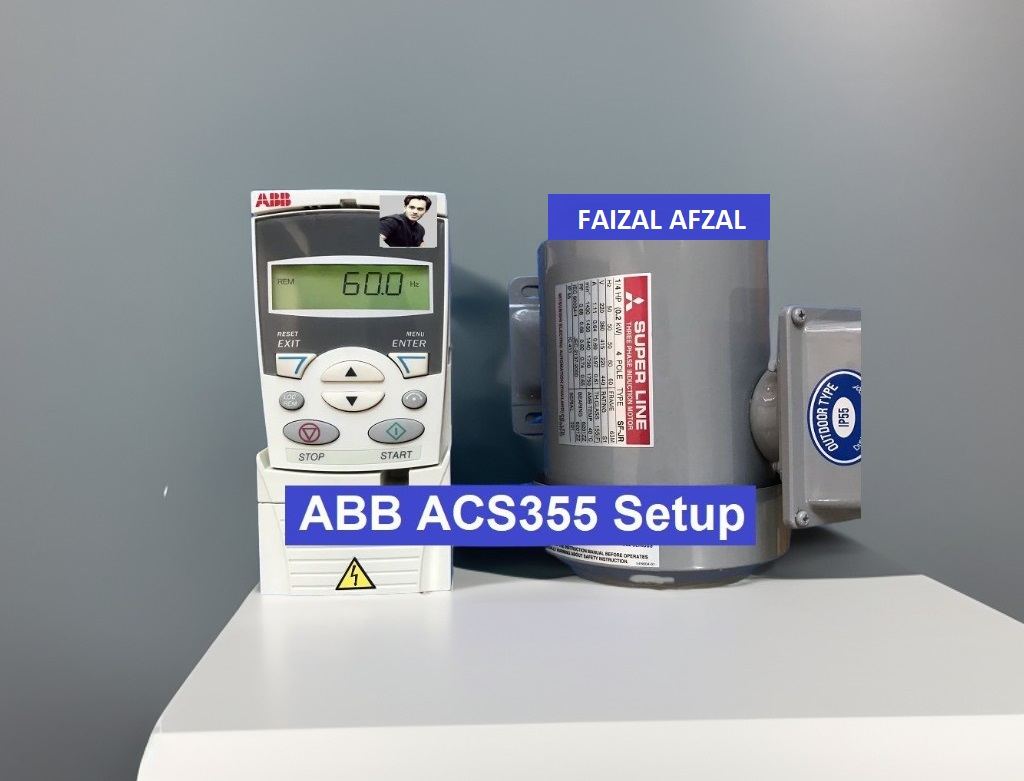
1. ABB ACS355 Wiring Diagram
Before diving into parameter settings, it’s crucial to establish the correct wiring connections for the ABB ACS355 VFD. Proper wiring ensures that the inverter operates safely and effectively, laying the groundwork for successful control and operation.
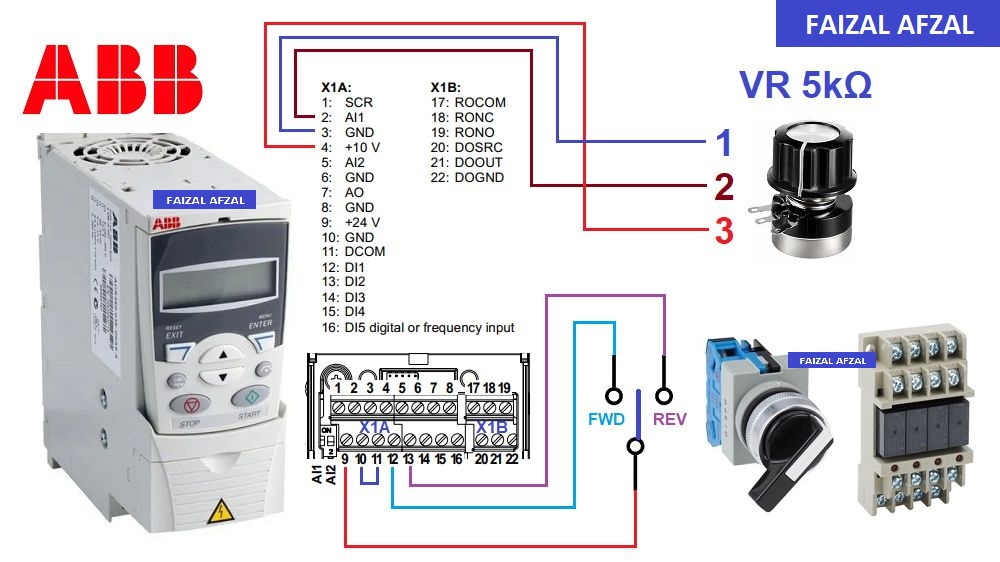
ABB ACS355 Wiring Diagram
Key Considerations:
- Power Supply Connections: Ensure that the input power is correctly connected to the designated terminals, following the manufacturer’s guidelines.
- Motor Connections: The motor should be connected to the output terminals of the inverter, with attention to phase sequence and grounding.
- Control Wiring: If external controls (such as PLCs, relays, or push buttons) are being used, ensure that these are correctly wired to the control terminals.
2. ABB ACS355 Parameter Settings
The next step in configuring the ABB ACS355 involves setting up its parameters. Proper parameter configuration is essential for the VFD to function according to the specific needs of your application.
Essential Parameters to Configure:
- Motor Nominal Voltage: Set the nominal voltage of the motor.
- Motor Nominal Current: Enter the motor’s rated current to ensure proper overload protection.
- Motor Nominal Frequency: Set the frequency at which the motor operates under normal conditions.
- Acceleration and Deceleration Time: Adjust the ramp-up and ramp-down times to suit the mechanical requirements of your system.
- Maximum and Minimum Frequency: Define the operating range for the motor’s speed.
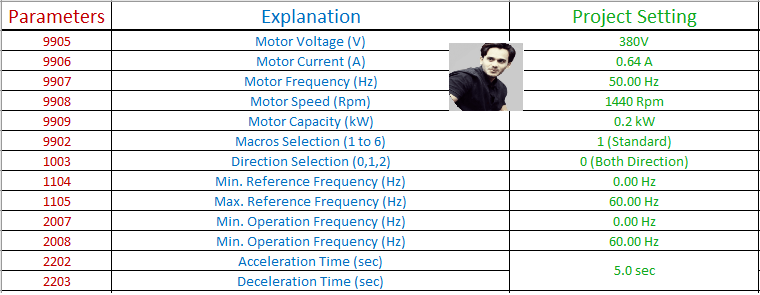
ABB ACS355 Parameter Setup
These basic settings will ensure that the ACS355 operates efficiently, offering optimal control over your motor’s performance.
3. ABB ACS355 Internal Control
For initial testing and simple operations, the internal control mode of the ABB ACS355 is highly effective. Using the keypad on the inverter, you can manually control the motor, making this the quickest and easiest method for setting up and verifying the inverter’s operation.
Steps to Use Internal Control:
- Set the Control Mode to Keypad:
- Access the control mode settings and select the keypad as the input source.
- Adjust the Speed:
- Use the keypad to set the desired frequency, which directly controls the motor speed.
- Start/Stop Operation:
- Utilize the start/stop buttons on the keypad to control motor operation.

ABB ACS355 Keypad Control
This mode is particularly useful during the setup phase or for applications where manual control is sufficient.
4. ABB ACS355 External Control
For more complex applications, the ABB ACS355 can be controlled externally using devices such as PLCs, relays, or push buttons. This mode is commonly employed in automated systems where remote control of the inverter is required.
External Control Setup:
- Configure Control Terminals:
- Assign the input terminals on the ACS355 to correspond with your external control devices.
- Set Control Source:
- In the inverter settings, select the external control option, allowing the ACS355 to receive commands from your external devices.
- Integration with PLC/Relay:
- Ensure that the PLC or relay logic is correctly programmed to send start, stop, and speed reference signals to the inverter.
- Testing:
- After configuration, test the external control setup to confirm that the inverter responds correctly to external commands.

ABB ACS355 External Control Wiring
Using external control not only allows for more flexible and automated operations but also integrates the inverter seamlessly into larger control systems.
Conclusion
This guide provides a detailed overview of setting up and configuring the ABB ACS355 VFD, covering both internal and external control methods. By following these steps, you can ensure that your ACS355 inverter is correctly installed and configured for optimal performance in your specific application.
The simplicity and efficiency of the ABB ACS355 make it an ideal choice for various industrial applications, offering robust control capabilities while minimizing the time and effort required for setup.