Delta DVP-14SS2 “Servo Control” with Mitsubishi MR-J4-A: A Detailed Tutorial
Written by FAIZAL AFZAL
Introduction
The Delta DVP-14SS2 PLC is one of Delta’s most popular models, known for its affordability, compact size, and ability to control up to two axes of stepper or servo motors. Its versatility makes it a favorite in small to medium-sized automation projects. This tutorial, authored by FAIZAL AFZAL, will guide you through the process of using the Delta DVP-14SS2 PLC to control a Mitsubishi MR-J4-A Servo Motor, a widely used servo in industrial automation. The tutorial is designed to be easy to follow, ensuring that even beginners can achieve successful motor control.
Step 1: Wiring Diagram for DVP-14SS2 & Mitsubishi MR-J4-A Servo
1.1 Overview of the Wiring Diagram
To control the Mitsubishi MR-J4-A Servo Motor with the Delta DVP-14SS2 PLC, it is crucial to establish the correct wiring connections. The following diagram represents the simplest and most effective wiring setup to control the servo motor.
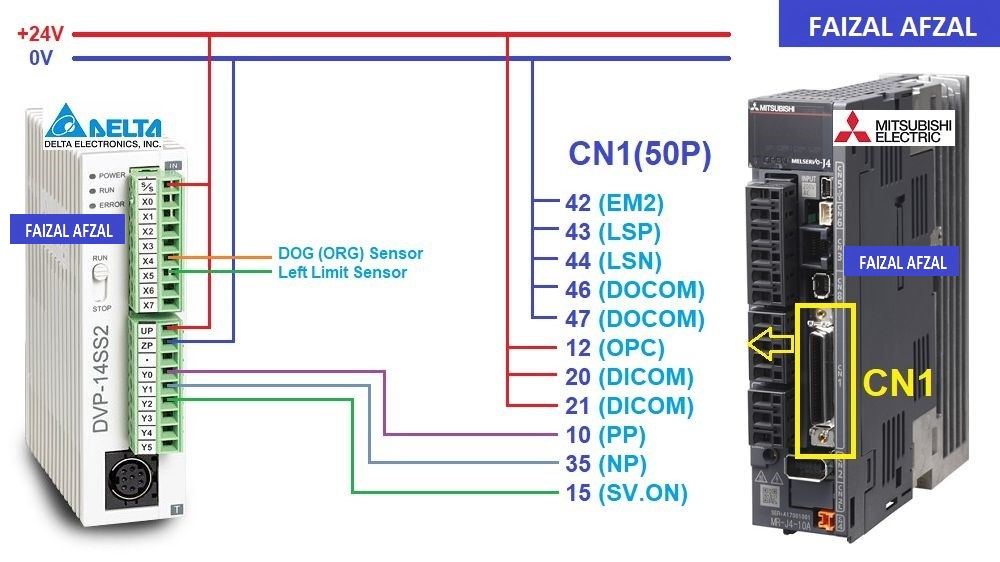 The wiring diagram between the Delta DVP-14SS2 PLC and the Mitsubishi MR-J4-A Servo Motor. This diagram clearly illustrate connections for power supply, pulse signals, direction signals, and additional control lines.
1.2 Detailed Wiring Instructions
- Power Supply Connections: Ensure that both the Delta DVP-14SS2 PLC and the Mitsubishi MR-J4-A Servo Motor are connected to their respective power supplies. The PLC typically operates on a 24V DC supply, while the servo motor might require a different voltage depending on your setup.
- Pulse and Direction Signals: Connect the output terminals of the PLC to the servo motor’s input terminals for pulse and direction signals. These signals dictate the movement and direction of the servo motor.
- Servo-ON Signal: Connect an output terminal from the PLC to the Servo-ON input of the MR-J4-A to enable or disable the servo motor as required by the control logic.
Step 2: I/O Address Table for Delta DVP-14SS2
2.1 Input and Output Configuration
In any PLC-based control system, configuring the correct I/O addresses is essential. The following I/O address table outlines the key inputs and outputs used in this tutorial:
- Inputs:
- X4: DOG (Origin) Sensor (Normally Open)
- X5: Left Limit Sensor (Normally Open)
- Outputs:
- Y0: Pulses Output
- Y1: Direction Output
- Y2: Servo-ON Output
These I/O addresses correspond to the physical terminals on the Delta DVP-14SS2 PLC and are used in the programming logic to control the servo motor.
Step 3: Configuring the Mitsubishi MR-J4-A Servo Driver
3.1 Overview of Driver Configuration
Correctly configuring the Mitsubishi MR-J4-A Servo Driver is crucial for seamless operation with the Delta DVP-14SS2 PLC. The configuration involves setting key parameters that govern the behavior of the servo motor.
3.2 Key Parameters for Configuration
- PA1: Servo Control Mode Selection
- Value: Set to
1000to select the position control mode. - Purpose: This mode is essential for precise positioning control, allowing the servo to move to exact positions based on pulse commands from the PLC.
- Value: Set to
- PA6/PA7: CMX/CDV (Input Pulse Gain Ratio)
- Default Value:
1/1. - Purpose: These parameters adjust the pulse-to-revolution ratio, ensuring that the servo motor interprets the pulses from the PLC correctly. The default setting corresponds to
131072 pulses/rev.
- Default Value:
- PA13: PLSS (Selection of Control Pulse Types)
- Default Value:
0100. - Purpose: Configures the type of pulse input that the servo motor will accept. This setting must be correct to ensure compatibility with the PLC’s pulse output method.
- Default Value:
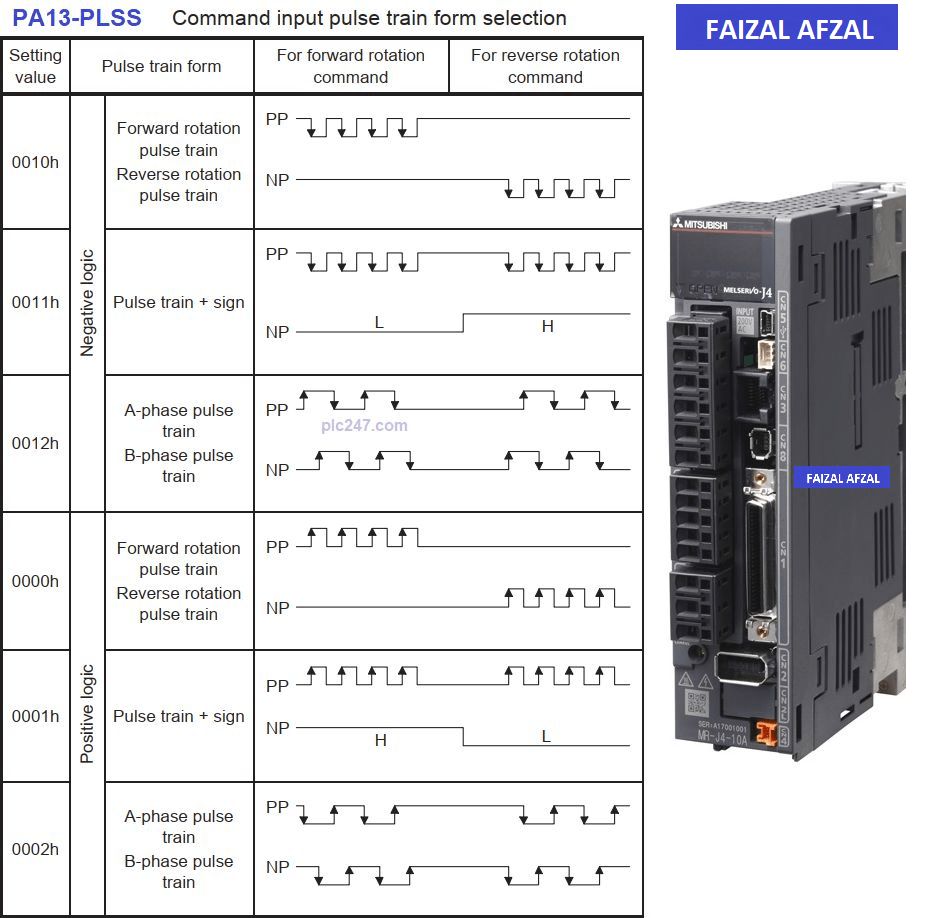
Table here that lists the various pulse input types and their corresponding settings
3.3 Recommended Configuration for This Project
For this specific project, the following parameter settings are recommended:
- PA1: Set to
1000for position control mode. - PA6/PA7: Maintain the default
1/1for accurate pulse gain ratio. - PA13: Set according to the pulse type used in your PLC configuration.
These settings ensure that your servo motor will operate efficiently and respond accurately to the control commands issued by the PLC.
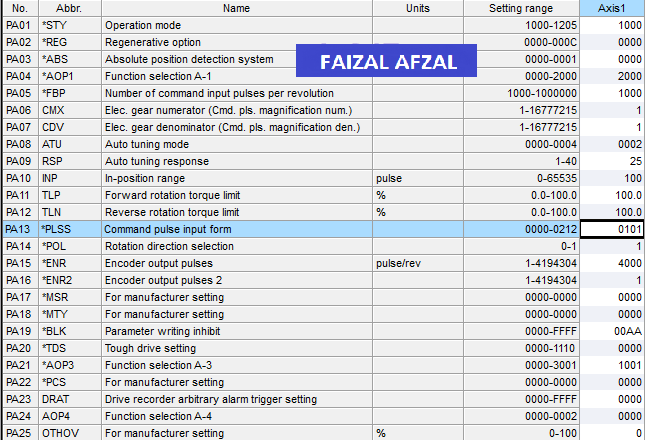
The key parameter values and their corresponding settings.
Step 4: Delta DVP-14SS2 Programming Instructions
4.1 Overview of PLC Programming
Programming the Delta DVP-14SS2 PLC involves writing a control program that manages the servo motor’s ON/OFF states, position control, and direction control. This section will guide you through the essential commands and logic required to achieve this.
4.2 Key Commands for Servo Control
The project primarily uses two important commands in the Delta DVP-14SS2 PLC programming:
- Zero Return (Origin Return) Command: This command is used to return the servo motor to its home or zero position. This is crucial for establishing a known starting point for subsequent movements.
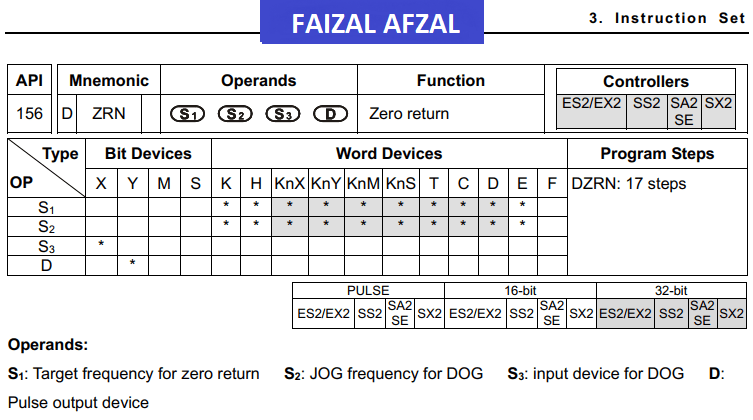
- Absolute Pulses Output Command: This command sends a specific number of pulses to the servo motor, causing it to move to an exact position. This is the core of position control in servo systems.
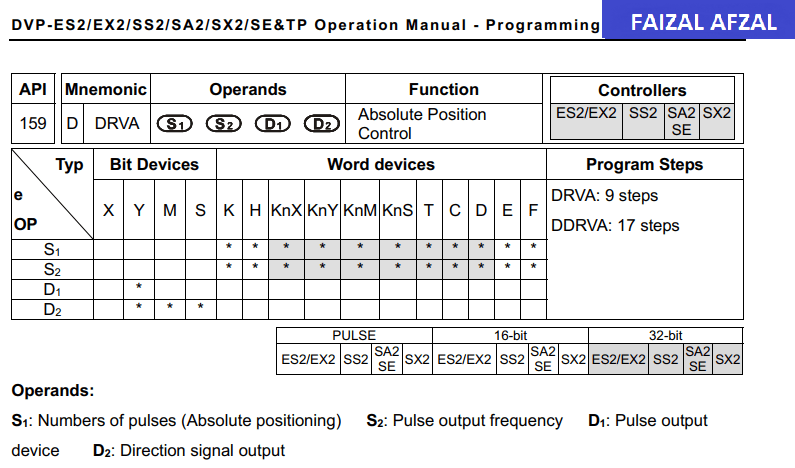
4.3 Example PLC Program
Below is an example of a simple program that controls the servo motor to move to three specific points. This program demonstrates the use of the commands mentioned above in a practical application.
- Servo-ON/OFF Control: The program includes logic to turn the servo motor on and off based on the input conditions (e.g., limit switches or start/stop commands).
- Position Control: The program sends pulses to the servo motor to move it to three predefined positions. The direction and speed of movement are controlled by adjusting the pulse and direction outputs.
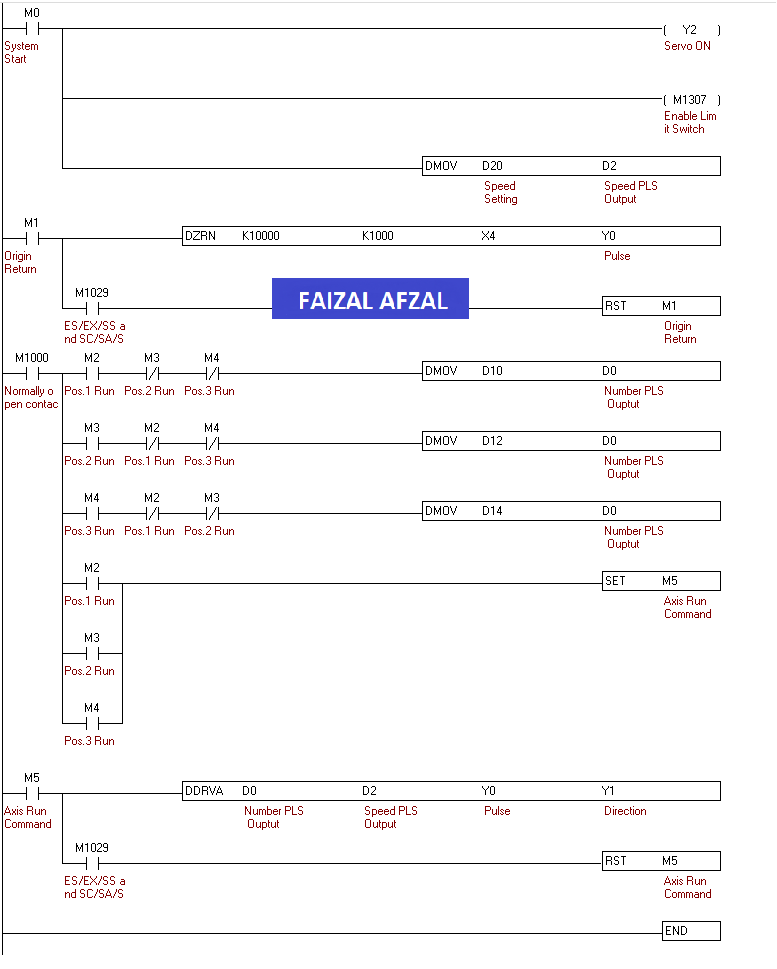
The control code used in the WPLSoft programming environment to implement these commands.
Conclusion
This tutorial has provided a comprehensive guide on how to control a Mitsubishi MR-J4-A Servo Motor using a Delta DVP-14SS2 PLC. By following these steps, you can achieve precise and reliable control over your servo motor, enhancing the performance and flexibility of your automation systems.
For further exploration, consider experimenting with more advanced PLC programming techniques and integrating additional sensors or control devices to expand the capabilities of your system.
For further assistance or more detailed information, please refer to the Mitsubishi manuals or contact a Mitsubishi Electric support representative.