Omron CP1H & Mitsubishi MR-J4 Servo “Origin Search”
Written by FAIZAL AFZAL
Introduction
Omron PLCs (Programmable Logic Controllers) and Mitsubishi Servo Motors are widely used in small to medium-sized industrial machines for precision control and automation. The Omron CP1H PLC, in particular, supports the control of up to four axes, making it a powerful tool for managing complex motion tasks. This tutorial will guide you through the process of configuring the Omron CP1H to control a Mitsubishi MR-J4 series servo motor, focusing on executing an “Origin Search” (ORG) operation.
This tutorial is essential for those looking to integrate Omron PLCs with Mitsubishi Servo Motors in industrial applications.
Next Post: Jog Process
- To continue learning, you can view the next post on the “Jog Process” by clicking CP1H & MR-J4-A “JOG Process”
- To continue learning, you can view the next post on the “Position Control” by clicking CP1H & MR-J4-A “Position Control”
Step 1: Configuring Omron CP1H PLC
To begin, you must configure the Omron CP1H PLC to communicate effectively with the Mitsubishi MR-J4 Servo Motor. Below are the detailed steps for setting up the CP1H:
1.1 Select Communication Port
- Port: Use Port 0 for pulse output.
- This port will handle the pulse signals necessary to control the servo motor.
1.2 Configure Pulse Output Method
- Method: Use the Pulse + Direction method.
- This method sends a pulse train for movement and a separate signal to determine direction (clockwise or counterclockwise).
- Output Address: Assign 100.00 for Pulse Output and 100.02 for Direction Control.
- These addresses will be used in the PLC program to control the servo motor.
1.3 PLC Setup
- Ensure that all related settings in the PLC setup are correctly configured for communication with the servo driver. This may include setting up I/O addresses, timers, and other necessary parameters.
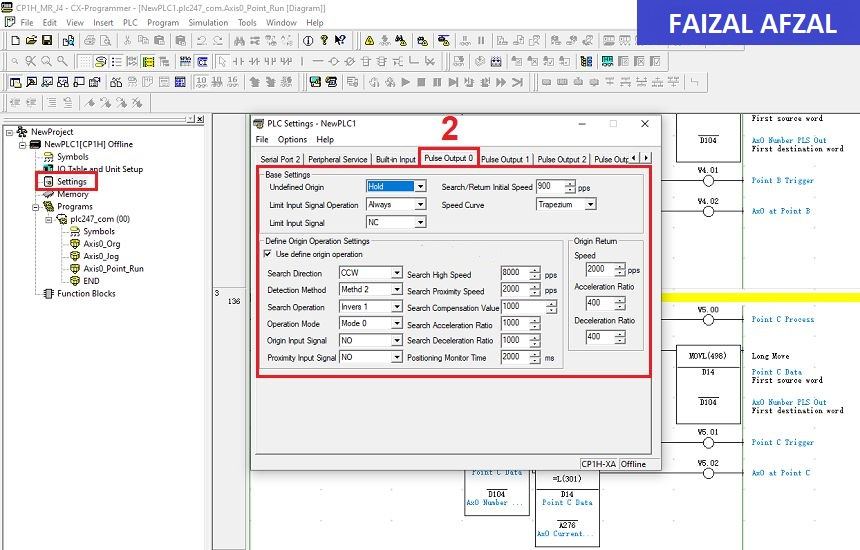
Omron CP1H configuration screen with the Port and Output method settings
Step 2: Configuring Mitsubishi MR-J4 Driver
Next, you will configure the Mitsubishi MR-J4 servo driver. The following parameters are crucial for ensuring proper communication and control:
2.1 Servo Control Mode
- PA1: Servo Control Mode Selection
- Value: Set to
1000. - Purpose: This setting selects the position control mode, allowing the servo to move to precise positions based on input pulses.
- Value: Set to
2.2 Command Input Pulses per Revolution
- PA5: Command Input Pulses per Revolution
- Value: Set to
1000 PLS / 1 REV. - Purpose: Defines the number of pulses required for one full revolution of the servo motor, ensuring accurate positioning.
- Value: Set to
2.3 Input Pulse Gain Ratio
- PA6/7: CMX / CDV (Input Pulse Gain Ratio)
- Default Value:
1/1 - Purpose: Adjusts the number of pulses per revolution, matching the pulse output from the PLC to the servo motor’s expected input. This ratio corresponds to
131072 pulses/revas the default.
- Default Value:
2.4 Selection of Control Pulse Types
- PA13: PLSS (Selection of Control Pulse Types)
- Default Value:
0100 - Purpose: Configures the pulse input type used by the servo motor. Adjust these settings to match the specific control pulse method used by the PLC.
- Default Value:
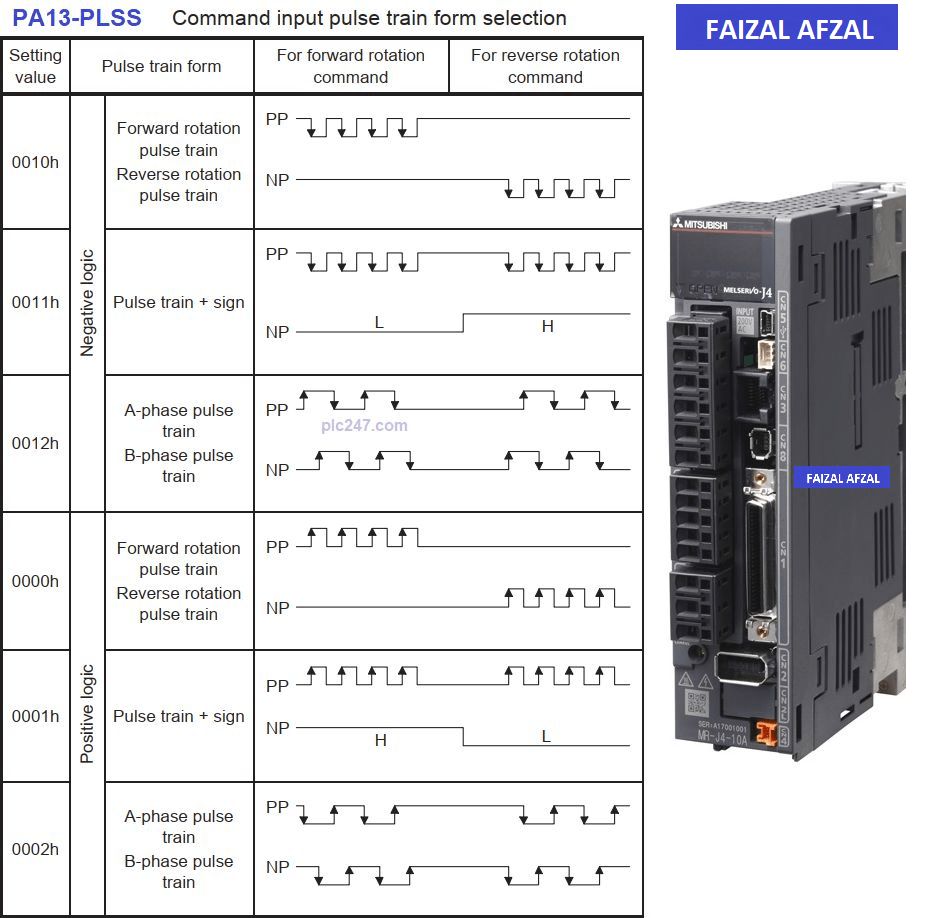
Table here showing the different Control Pulse Types
Step 3: Connection Diagram Between CP1H and MR-J4_A
To establish a connection between the Omron CP1H PLC and the Mitsubishi MR-J4 servo motor, follow the wiring diagram provided. This is a basic setup designed for ease of understanding and is suitable for beginners.
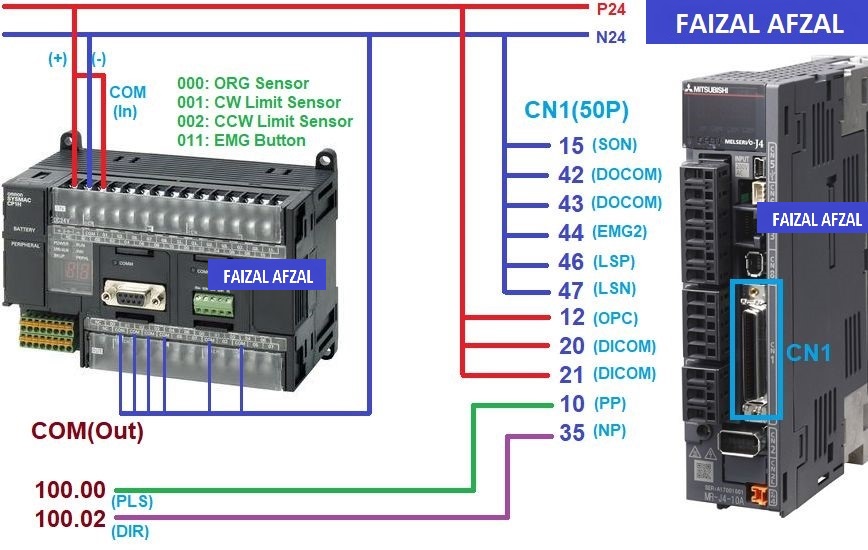
Wiring diagram here that shows the connections between the CP1H PLC and the MR-J4 servo motor, including power connections, I/O wiring, and communication lines
Step 4: Programming Omron CP1H PLC
Now that the hardware is configured, you can proceed to program the Omron CP1H PLC to control the Mitsubishi MR-J4 servo motor. The focus here is on using the Origin Search (ORG) command.
4.1 Understanding the ORG Command
The Omron CP1H PLC is equipped with four pulse generator ports. In this tutorial, we will use Port 1 (Port 0) for sending pulses to the servo motor.
- ORG Command: This command is used to find the origin or home position of the servo motor. It is essential for initializing the motor before starting any operation.
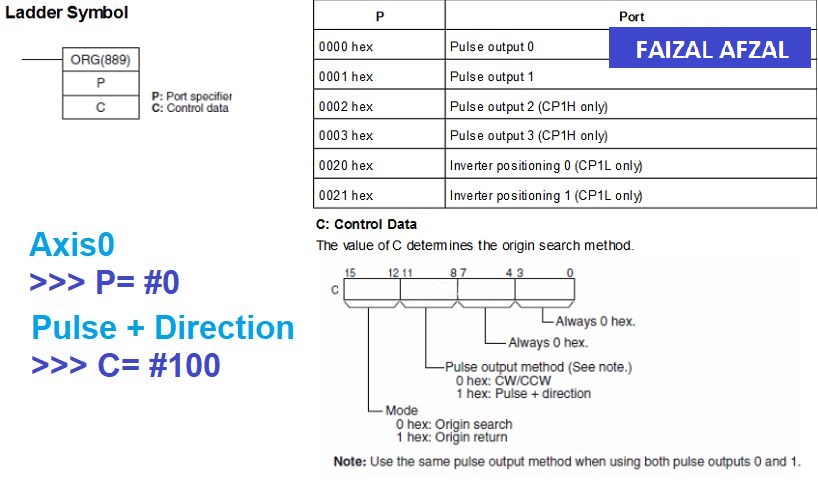
The ladder instrcution of the ORG command in Omron CP1H
- INI Command: The program uses the INI (Initialize) command twice:
- First Usage: To immediately stop pulse output.
- Second Usage: To reset the Axis 0 pulse count, ensuring accurate tracking of motor position.
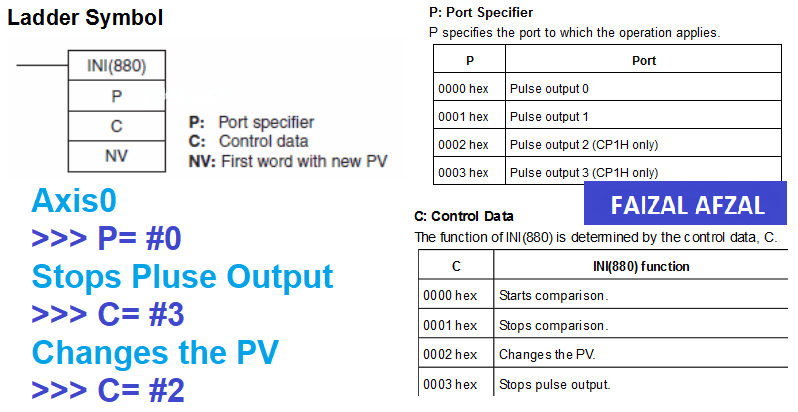
The ladder instrcution of the INI command in Omron CP1H
Step 5: I/O Address Table
The I/O Address Table outlines the input and output addresses used in the PLC program for controlling the servo motor. This table is crucial for mapping physical inputs/outputs to the corresponding software commands.
5.1 Input Signals
- 000: Org Sensor
Detects the home position of the servo motor. - 001: CW (Clockwise) Limit Sensor
Monitors the forward limit to prevent over-travel in the clockwise direction. - 002: CCW (Counter-Clockwise) Limit Sensor
Monitors the reverse limit to prevent over-travel in the counter-clockwise direction. - 011: Emergency (EMG) Button
An emergency stop button to halt operations immediately. - 280.04: Axis 0 Busy (Internal Address)
Indicates whether Axis 0 is currently active or busy. - 280.05: Axis 0 No Org (Internal Address)
Indicates whether Axis 0 has not yet reached the origin. - 280.06: Axis 0 at Org (Internal Address)
Indicates whether Axis 0 is currently at the origin position.
5.2 Output Signals
- 100.00: Pulse Output
Sends pulse signals to the servo motor for positioning. - 100.02: Direction Output
Determines the direction of movement for the servo motor.
Step 6: Programming Functions
6.1 Sensor Status
The program checks the status of various sensors before executing any motion commands. This includes verifying that the limit sensors and origin sensors are functioning correctly to prevent any accidental damage to the system.
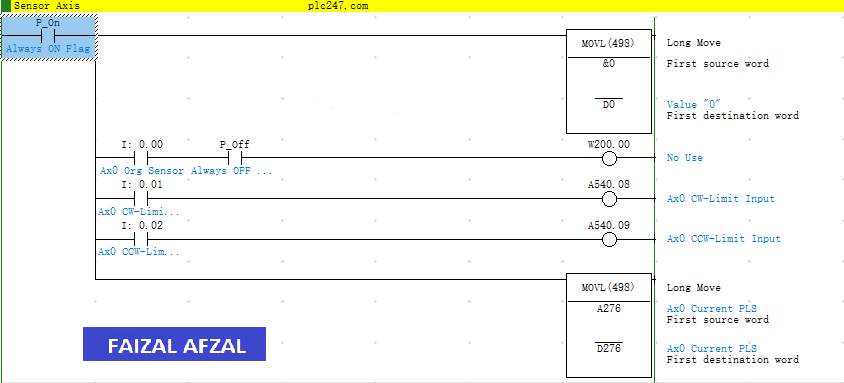
Code snippet showing how sensor statuses are checked in the program
6.2 Stop Pulses Output
In the event of an emergency or if the system needs to halt, the program will execute a command to stop all pulse outputs immediately.
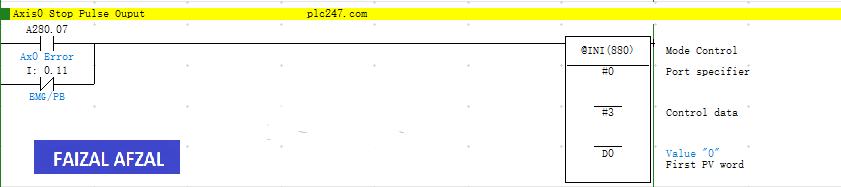
Explanation of the code that stops the pulse output
6.3 Origin Recover
The Origin Recover function is used to move the servo motor back to its origin position after it has been stopped or interrupted. This ensures that all subsequent operations start from a known position.
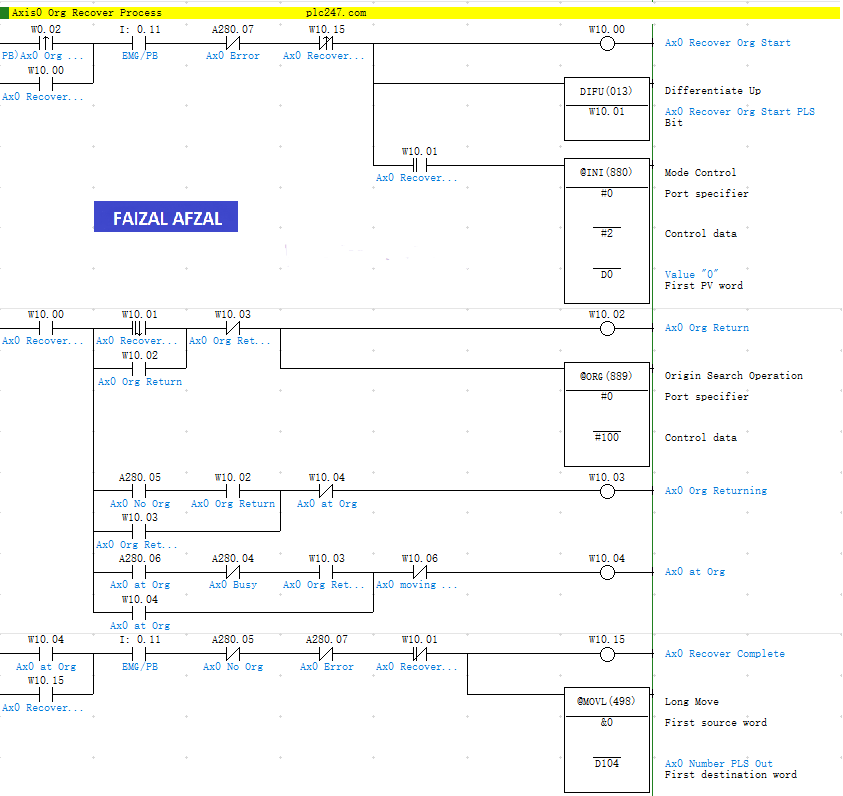
Example code of the Origin Recover functionality
Conclusion
This tutorial has provided a comprehensive guide on how to configure and program an Omron CP1H PLC to control a Mitsubishi MR-J4 series servo motor, specifically focusing on the Origin Search operation. By following the steps outlined, you can successfully integrate these two powerful pieces of industrial equipment to achieve precise motion control in your applications.
For more advanced programming techniques and further exploration of servo control, continue to the next tutorial in this series.